Guide
Instagram competitor analysis: research a competitor's audience.
Updated · By the ProfileMira team
The short answer
An Instagram competitor analysis compares three things: what competitors post, how people engage with it, and who their audience is. Content and engagement are visible on their profiles; the audience is the part most analyses skip, because Instagram Insights only ever cover your own account.
To research it, collect a sample of each competitor's public followers, look at who those followers are (verified, private, business accounts and their categories), and measure how much of that audience you already share. The template below puts the results side by side.
What to compare
| Part | Questions | Where the answer comes from |
|---|---|---|
| Content | What do they post, in which formats, and how often? | Their profile grid, Reels and highlights, reviewed by hand over a few weeks |
| Engagement | Which posts get likes, comments and views? | The counts shown on each post, or a social media analytics tool |
| Audience | Who follows them, and how much of that audience do you share? | Their public follower and following lists, collected and reviewed in ProfileMira |
ProfileMira covers the audience part only. It does not measure content, engagement or reach, and it does not infer anyone's age, gender or location.
Research a competitor's audience, step by step
1. Pick three to five competitors
Choose accounts your customers could follow instead of you: direct competitors, plus one or two creators or publications in your niche. All of them must be public.
2. Collect the same-size sample from each
Run a Followers extraction on each competitor and ask for the same number of profiles from each, for example 2,000. Equal samples keep the comparison fair; a full list of one competitor next to a sample of another skews every percentage. A Standard extraction costs 1 credit per profile, so the free Trial (1,000 one-time credits) is enough to try the method on a small sample.
3. Review who follows them
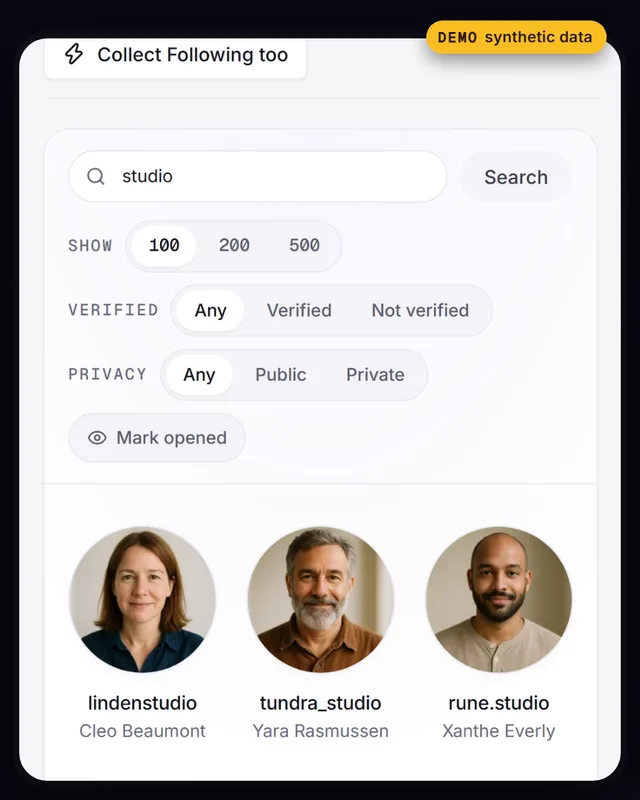
In each Collection, filter by Verified and Privacy. The filters run across every collected profile, so the counts you see describe the whole sample, not one page.
4. Add profile details where they matter
On a paid plan, Profile Intelligence adds each profile's follower, following and post counts, bio and website, business status and category, for 25 credits per new profile. Enriching a few hundred followers per competitor is usually enough to see which categories dominate, for example local businesses, creators or other brands.
5. Measure the overlap with your own audience
Collect your own account's followers the same way, export the lists as CSV and count the followers you share with each competitor. How to compare Instagram followers between two accounts has the exact formulas.
6. Look at who they follow
A competitor's Following list shows the creators, partners and suppliers it keeps up with, which often reveals its collaborations before they are announced. See exporting a following list.
A competitor audience template
Copy this table into a spreadsheet, one row per competitor and one for your own account. Every column comes from the steps above.
| Account | Followers sampled | Verified | Private | Business accounts | Top categories | Shared with you |
|---|---|---|---|---|---|---|
| Your account | 2,000 | 0.4% | 38% | 21% | Retail, Beauty | — |
| Competitor A | 2,000 | 1.1% | 31% | 34% | Beauty, Health | 12% |
| Competitor B | 2,000 | 0.2% | 52% | 9% | Personal blog | 4% |
In the Excel export, Verified (column E) and Private (column F) hold Yes or No, so each share is one formula. For a sample of 2,000 profiles below the header row:
Share of verified followers in the sample
=COUNTIF(E2:E2001, "Yes") / COUNTA(E2:E2001)Use column F the same way for the private share. The business share and top categories come from the Profile Intelligence columns of the enriched export, counted the same way.
Reading the results
- High overlap with a competitor means you already reach the same people: compete on offer and content, not reach.
- Low overlap with a similar business share points to an audience you could win: the same kind of followers, not yet following you.
- A high private share usually means a personal, consumer audience; a high business share means the account is followed by other brands and professionals.
- Categories show what else the audience is: shops, creators, agencies. They describe the followers' own accounts, not their interests.
A follower list shows who chose to follow an account. It cannot tell you who is active or genuine, and ProfileMira does not score fake followers.
Limits worth knowing
- Public accounts only. A private competitor's followers cannot be read.
- Samples and incomplete lists. The number collected can be lower than the count on the profile; each extraction reports how it ended (see why an extraction can stop early).
- Exports and Profile Intelligence need a paid plan. The Trial lets you collect and browse audiences.
- Public information, used responsibly. Use what you find within the Terms and the privacy and marketing laws that apply to you.
Can I see a competitor's Instagram Insights?
- No. Insights are private to each account's owner. A competitor analysis works from public information: posts, visible engagement counts, and public follower and following lists.
How many followers should I analyze per competitor?
- Enough to be representative and the same number for each competitor. A few thousand followers per account is a practical start; analyze all of them on a paid plan with All available if the decision depends on it.
Does ProfileMira detect fake followers?
- No. It collects public profiles and their public details. It does not score accounts as fake, active or inactive, and it does not infer demographics.
Is ProfileMira affiliated with Instagram?
- No. ProfileMira is independent and is not affiliated with, endorsed by or sponsored by Instagram or Meta.
Start your competitor audience research.
Start with 1,000 one-time Standard credits. No card required, and no Instagram login.