Guide
Instagram followers vs following: who doesn't follow back.
Updated · By the ProfileMira team
The short answer
Followers are the accounts that follow an Instagram account; following is the list of accounts it follows. Compare the two lists and every account falls into one of three groups: in both lists (mutual), followed but not following back, or following without being followed back.
Instagram does not show a “doesn't follow back” list. For any public account, collect both lists in ProfileMira and filter the Relationship column of the Excel export; for your own account, you can also compare the two lists from Instagram's free data download in a spreadsheet.
What each list tells you
Both lists belong to the same account, but they answer different questions. Put side by side, they sort every profile into one of three groups:
| Group | In which list | What it tells you |
|---|---|---|
| Mutual | Followers and following | Accounts that follow each other with this one: often friends, collaborators, partner brands or a creator's peers |
| Doesn't follow back | Following only | Accounts this one follows that do not follow it: usually larger accounts, brands, news and inspiration sources |
| Not followed back | Followers only | People who follow this account without being followed in return: for most public accounts, the bulk of the audience |
For a brand or a creator, the Following list is the more revealing of the two: it is chosen, not earned, so it shows the partners, peers and sources the account keeps up with. Exporting a following list covers that list on its own.
Find who doesn't follow back, for any public account
ProfileMira files every extraction of the same account in one Collection. Once the Collection holds both lists, it does the comparison for you; no formulas are needed.
- Run a Followers extraction and a Following extraction on the account. Both audiences are available on the free Trial (1,000 one-time Standard credits, one credit per profile).
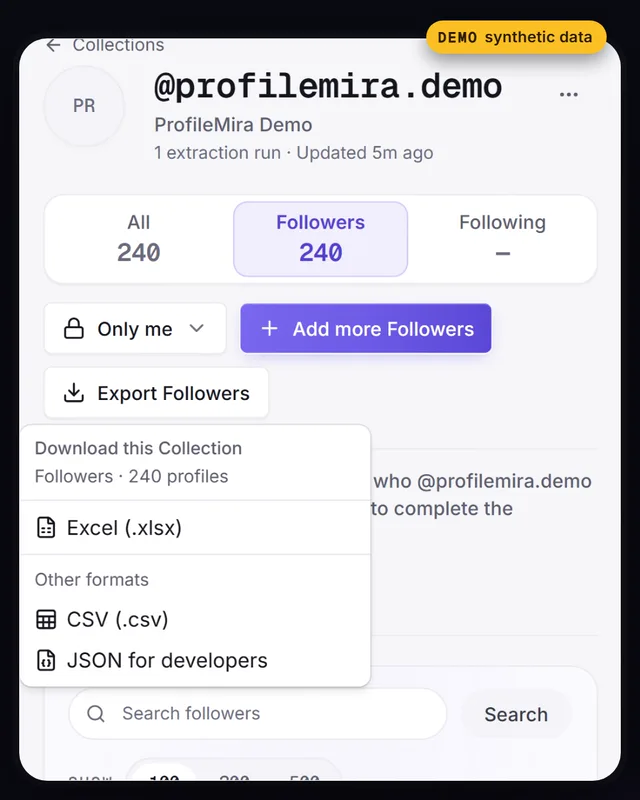
- Open the account's Collection and select All: every unique profile appears once, with Followers and Following counts above it.
- Choose Export → Excel (.xlsx). The Relationship column says Follower, Following or Both, and the Summary sheet counts how many profiles are in both lists.
- Filter Relationship to Following for the accounts that don't follow back, to Both for the mutuals, or to Follower for the followers it does not follow back.
This works for your own account too, as long as it is public when you run the extractions. ProfileMira never asks for your Instagram login.
Your own account, with Instagram's data download
For your own account, Instagram's free data download includes your followers and the accounts you follow, as two lists of usernames. How to export Instagram followers to Excel walks through requesting it and opening it in Excel. Then:
- Put the usernames you follow in column A of a sheet named Following, and your followers' usernames in column A of a sheet named Followers, each with a header in row 1.
- In the Following sheet, fill this formula down column B. It works the same in Excel and Google Sheets:
Following sheet, row 2: does this account follow you back?
=IF(COUNTIF(Followers!A:A, A2) > 0, "Mutual", "Doesn't follow back")Filter column B to Doesn't follow back. Swap the sheet names in the formula to find the followers you do not follow back.
Be wary of apps that ask for your Instagram password to show who doesn't follow you back. Neither method on this page needs it.
Reading the following ratio
Dividing the following count by the follower count gives a quick read of how an account grew. It is a hint about behaviour, not a verdict on quality.
| Illustrative account | Followers | Following | Ratio |
|---|---|---|---|
| A brand | 48,000 | 310 | 0.006 |
| A creator | 12,000 | 950 | 0.08 |
| A personal account | 800 | 760 | 0.95 |
A very low ratio is typical of brands and established creators, who follow a short, chosen list. A ratio near or above one is normal for personal accounts, and on a business account it can point to follow-for-follow growth. Looking at who sits in the mutual group says more than the ratio itself.
Limits worth knowing
- The account must be public. A private account's followers and following cannot be read.
- It is a snapshot, not tracking. The comparison covers the two lists as they were when collected. ProfileMira does not monitor accounts or report who followed or unfollowed them.
- Lists can be incomplete. The number collected can be lower than the count on the profile, and each extraction reports how it ended (see why an extraction can stop early). An account missing from an incomplete list is not proof that it does not follow back.
- Exports need a paid plan. On the Trial you can collect both lists and browse the All view; the Excel, CSV and JSON files are included on every paid plan.
Comparing two different accounts instead? See how to compare Instagram followers between two accounts.
Does Instagram show who doesn't follow you back?
- No. Instagram shows your followers and your following as separate lists, and does not mark which accounts are missing from the other one. Comparing the two lists, as above, is how you find them.
Can ProfileMira show who unfollowed an account?
- No. ProfileMira compares an account's followers and following as collected at one moment. It does not monitor accounts or keep a history of follows and unfollows.
Can I do this on the free Trial?
- Yes, for collecting and browsing: the Trial includes 1,000 one-time Standard credits and both audiences, and the Collection's All view shows the combined list. Downloading the Excel file with the Relationship column needs a paid plan.
Is ProfileMira affiliated with Instagram?
- No. ProfileMira is independent and is not affiliated with, endorsed by or sponsored by Instagram or Meta.
See both lists side by side.
Start with 1,000 one-time Standard credits. No card required, and no Instagram login.